> ## Documentation Index
> Fetch the complete documentation index at: https://docs.tembo.io/llms.txt
> Use this file to discover all available pages before exploring further.

# Agents

> Run coding agents on a schedule or triggered by events.
<Frame>
  <img src="https://mintcdn.com/test-8862363a/_KF7n4fDwDrxMgZe/images/automation-light.png?fit=max&auto=format&n=_KF7n4fDwDrxMgZe&q=85&s=13a9adad2d53842e6be32b3bfbea77ac" alt="Agents" className="block dark:hidden" width="1200" height="675" data-path="images/automation-light.png" />

  <img src="https://mintcdn.com/test-8862363a/_KF7n4fDwDrxMgZe/images/automation-dark.png?fit=max&auto=format&n=_KF7n4fDwDrxMgZe&q=85&s=dae9e0e2e8caefb96f5a3b8b5ea49d8b" alt="Agents" className="hidden dark:block" width="1200" height="675" data-path="images/automation-dark.png" />
</Frame>

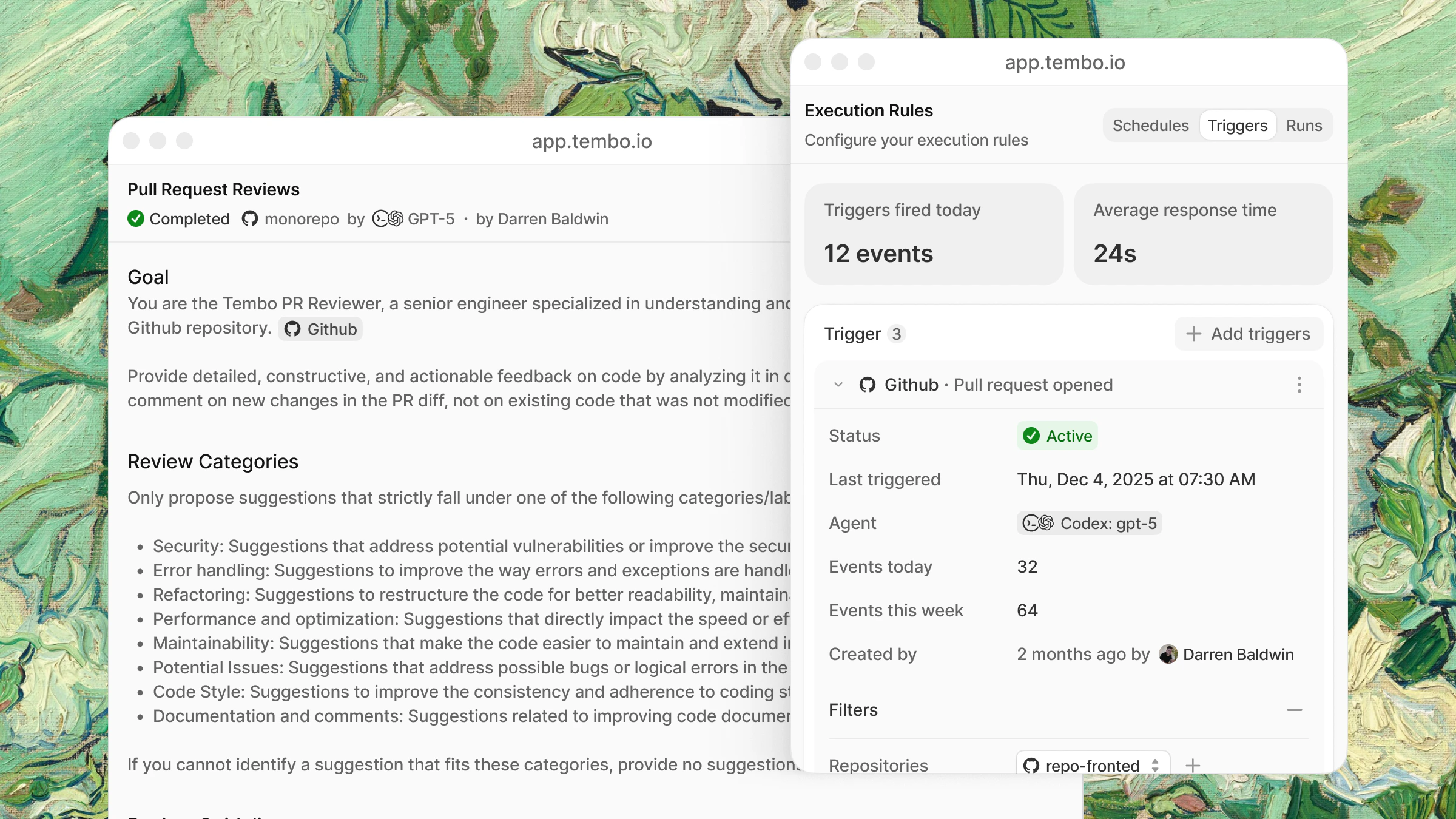
Run coding agents in the background, on a schedule or triggered by events. A Sentry error gets fixed within seconds. Docs stay in sync with your code. Security vulnerabilities get caught before they become problems.
Each agent runs in a secure [sandbox](/features/sandbox/overview) with full codebase and repository access and your configured [MCP servers](/integrations/mcp).

## Agent harness

Tembo is harness and model agnostic. For each agent you configure, you pick the harness (and model) that runs in the session it spawns, for example Claude Code with Sonnet 5.5, Codex with GPT-5.4, or Cursor. Set a default per agent, or override per session.

See [Models](/features/models) for the full supported model list, BYOK details, and AWS Bedrock BYOK support.

<AccordionGroup>
  <Accordion title="Claude Code" icon={<svg viewBox="0 0 16 16" fill="none" xmlns="http://www.w3.org/2000/svg"><path d="M3.43196 10.4658L6.39022 8.81139L6.43971 8.66719L6.39022 8.58751H6.24554L5.7506 8.55715L4.06016 8.51161L2.59436 8.4509L1.17425 8.37501L0.816364 8.29912L0.481323 7.85894L0.515589 7.63886L0.816364 7.43775L1.24659 7.47569L2.19841 7.5402L3.62613 7.63886L4.66171 7.69957L6.19605 7.85894H6.43971L6.47398 7.76028L6.39022 7.69957L6.32549 7.63886L4.84827 6.64088L3.24921 5.58599L2.41161 4.97885L1.95855 4.67149L1.73011 4.3831L1.63112 3.7532L2.04231 3.30165L2.59436 3.33959L2.73523 3.37754L3.2949 3.80633L4.49039 4.72841L6.05137 5.87438L6.27981 6.06411L6.37118 5.9996L6.3826 5.95406L6.27981 5.78331L5.43078 4.25409L4.52465 2.69831L4.12108 2.05323L4.01448 1.66618C3.9764 1.50681 3.94975 1.374 3.94975 1.21083L4.41805 0.577133L4.67694 0.493652L5.30134 0.577133L5.56404 0.804808L5.95238 1.68895L6.58058 3.08156L7.55524 4.97506L7.84079 5.53666L7.99308 6.05652L8.05019 6.21589H8.14918V6.12482L8.22913 5.05854L8.37762 3.74941L8.52229 2.06461L8.57179 1.59029L8.80784 1.0211L9.27613 0.713738L9.64163 0.888289L9.94241 1.31708L9.90053 1.59408L9.72159 2.75143L9.37132 4.56524L9.14288 5.77951H9.27613L9.42842 5.62773L10.0452 4.81189L11.0808 3.52173L11.5377 3.00946L12.0707 2.44407L12.4133 2.17465H13.0606L13.5365 2.88045L13.3233 3.60901L12.657 4.45141L12.1049 5.16479L11.313 6.22727L10.8181 7.07726L10.8638 7.14556L10.9818 7.13418L12.7712 6.75472L13.7383 6.58017L14.8919 6.38285L15.4135 6.6257L15.4706 6.87235L15.265 7.37703L14.0314 7.6806L12.5847 7.96899L10.4297 8.47746L10.4031 8.49644L10.4335 8.53438L11.4044 8.62545L11.8194 8.64822H12.8359L14.7282 8.78862L15.2231 9.11495L15.5201 9.51338L15.4706 9.81695L14.7091 10.204L13.6812 9.96115L11.2826 9.39196L10.4602 9.18705H10.346V9.25535L11.0313 9.9232L12.2877 11.054L13.8601 12.5111L13.94 12.8716L13.7383 13.1562L13.5251 13.1258L12.143 12.0899L11.61 11.6232L10.4031 10.61H10.3231V10.7163L10.6011 11.1223L12.0707 13.3231L12.1468 13.9986L12.0402 14.2187L11.6595 14.3515L11.2407 14.2756L10.3802 13.0727L9.49315 11.718L8.77738 10.5038L8.68981 10.5531L8.26721 15.0876L8.06923 15.3191L7.61235 15.4937L7.23163 15.2053L7.02984 14.7385L7.23163 13.8164L7.47529 12.6136L7.67327 11.6573L7.85221 10.4696L7.95882 10.075L7.9512 10.0484L7.86363 10.0598L6.96512 11.2893L5.5983 13.1296L4.51704 14.2832L4.25814 14.3856L3.80888 14.1542L3.85076 13.7406L4.10204 13.3725L5.5983 11.4752L6.50063 10.2989L7.08314 9.61963L7.07933 9.52097H7.04507L3.07027 12.0937L2.36212 12.1848L2.05754 11.9002L2.09561 11.4334L2.24029 11.2817L3.43577 10.462L3.43196 10.4658Z" fill="#D97757"/></svg>}>
    Anthropic's Claude models. Best balance of quality, reliability, and cost.

    **Models:** Opus 5.5, Opus 5, Fable 5.1, Fable 5, Sonnet 5.5, Opus 4.8, Opus 4.7, Opus 4.6, Opus 4.5, Haiku 4.5
  </Accordion>

  <Accordion title="Codex" icon={<svg viewBox="0 0 16 16" fill="none" xmlns="http://www.w3.org/2000/svg"><path d="M13.268 8C13.268 5.09056 10.9094 2.73203 8 2.73203C5.09056 2.73203 2.73203 5.09056 2.73203 8C2.73203 10.9094 5.09056 13.268 8 13.268C10.9094 13.268 13.268 10.9094 13.268 8ZM10.6664 9.1344L10.7742 9.14528C11.0164 9.19504 11.1983 9.40952 11.1984 9.6664C11.1984 9.92336 11.0165 10.1378 10.7742 10.1875L10.6664 10.1984H8.6664C8.37272 10.1983 8.1344 9.96016 8.1344 9.6664C8.13448 9.3728 8.3728 9.13448 8.6664 9.1344H10.6664ZM6.12266 9.94064C5.97142 10.1923 5.64482 10.2738 5.39297 10.1226C5.14114 9.97152 5.05913 9.64488 5.21016 9.39296L6.12266 9.94064ZM7.12266 7.72656C7.22365 7.89498 7.22365 8.10504 7.12266 8.27344L6.12266 9.94064L5.66641 9.6664L5.21016 9.39296L6.04531 8L5.21016 6.60703L5.66641 6.33359L6.12266 6.05938L7.12266 7.72656ZM5.39297 5.87735C5.64482 5.72623 5.97142 5.80764 6.12266 6.05938L5.21016 6.60703C5.05913 6.35514 5.14114 6.0285 5.39297 5.87735ZM14.332 8C14.332 11.497 11.497 14.332 8 14.332C4.50294 14.332 1.66797 11.497 1.66797 8C1.66797 4.50294 4.50294 1.66797 8 1.66797C11.497 1.66797 14.332 4.50294 14.332 8Z" fill="currentColor"/></svg>}>
    OpenAI's GPT models with configurable reasoning effort (low, medium, high, xhigh). GPT-6.1 Sol, GPT-6 Astra, GPT-6 Sol, GPT-5.6 Sol, and GPT-5.6 Terra also support max and ultra; GPT-6 Luna and GPT-5.6 Luna also support max.

    **Models:** GPT-6.1 Sol, GPT-6 Astra, GPT-6 Sol, GPT-6 Luna, GPT-5.6 Sol, GPT-5.6 Terra, GPT-5.6 Luna, GPT-5.5 Pro, GPT-5.5, GPT-5.4, GPT-5.3 Codex, GPT-5.4 Mini, GPT-5.4 Nano
  </Accordion>

  <Accordion title="Cursor" icon={<svg viewBox="0 0 16 16" fill="none" xmlns="http://www.w3.org/2000/svg"><path d="M14.4734 3.9527L8.31773 0.398522C8.22052 0.342485 8.11029 0.312988 7.99809 0.312988C7.88589 0.312988 7.77566 0.342485 7.67846 0.398522L1.52355 3.9527C1.44182 3.99989 1.37394 4.06773 1.32671 4.14942C1.27948 4.23112 1.25457 4.32379 1.25446 4.41816V11.584C1.25457 11.6783 1.27948 11.771 1.32671 11.8527C1.37394 11.9344 1.44182 12.0022 1.52355 12.0494L7.67918 15.6036C7.77636 15.6597 7.8866 15.6893 7.99882 15.6893C8.11103 15.6893 8.22127 15.6597 8.31846 15.6036L14.4741 12.0502C14.5558 12.003 14.6237 11.9351 14.6709 11.8534C14.7182 11.7717 14.7431 11.6791 14.7432 11.5847V4.41743C14.7431 4.32307 14.7182 4.23039 14.6709 4.14869C14.6237 4.067 14.5558 3.99916 14.4741 3.95198L14.4734 3.9527ZM14.0872 4.70543L8.14464 14.9978C8.10464 15.0669 7.99846 15.0385 7.99846 14.9578V8.21889C7.99841 8.15254 7.98092 8.08738 7.94773 8.02993C7.91454 7.97249 7.86682 7.92478 7.80936 7.89161L1.97373 4.52361C1.90391 4.48289 1.93227 4.3767 2.013 4.3767H13.8966C14.0661 4.3767 14.1715 4.55925 14.0872 4.70543Z" fill="currentColor"/></svg>}>
    Multi-provider via Cursor CLI.

    **Models:** Composer 2.5, Composer 2, Composer 2 Fast, Composer 1.5, Opus 5.5, Opus 5, Sonnet 5.5, Opus 4.8, Opus 4.7, Opus 4.6, Opus 4.5, GPT-5.6 Sol, GPT-5.6 Terra, GPT-5.5, GPT-5.3 Codex, GPT-5.3 Codex Spark, Gemini 3.1 Pro, Gemini 3.5 Flash, Grok 4.7
  </Accordion>

  <Accordion title="Opencode" icon={<svg viewBox="0 0 240 300" fill="none" xmlns="http://www.w3.org/2000/svg"><path d="M180 240H60V120H180V240Z" fill="currentColor" opacity="0.4"/><path d="M180 60H60V240H180V60ZM240 300H0V0H240V300Z" fill="currentColor"/></svg>}>
    Multi-provider support: Anthropic, OpenAI, and OSS models.

    **Models:** Opus 5.5, Opus 5, Fable 5.1, Fable 5, Sonnet 5.5, Opus 4.8, Opus 4.7, Opus 4.6, Opus 4.5, Haiku 4.5, GPT-6.1 Sol, GPT-6 Astra, GPT-6 Sol, GPT-6 Luna, GPT-5.6 Sol, GPT-5.6 Terra, GPT-5.6 Luna, GPT-5.5 Pro, GPT-5.5, GPT-5.4, GPT-5.3 Codex, GPT-5.4 Mini, GPT-5.4 Nano, Gemini 3.1 Pro, Gemini 3.5 Flash, Grok 4.7, GLM 5.3, GLM 5.3 Flash, Kimi K3, DeepSeek V4 Pro, DeepSeek V4.1 Flash, MiniMax M2.7, MiniMax M3
  </Accordion>

  <Accordion title="Amp" icon={<svg viewBox="0 0 16 16" fill="none" xmlns="http://www.w3.org/2000/svg"><path d="M2.8757 14.567L6.63971 10.7497L8.0095 15.9505L9.99942 15.4062L8.01684 7.8548L0.585336 5.84207L0.0561523 7.87535L5.16975 9.26441L1.42137 13.0761L2.8757 14.567Z" fill="#F34E3F"/><path d="M13.7302 10.142L15.7201 9.59774L13.7376 2.04635L6.30603 0.0336304L5.77686 2.06691L12.0524 3.77164L13.7302 10.142Z" fill="#F34E3F"/><path d="M10.8738 13.0444L12.8637 12.5001L10.8811 4.9487L3.44959 2.93597L2.92041 4.96925L9.19587 6.67399L10.8738 13.0444Z" fill="#F34E3F"/></svg>}>
    Claude-powered with automatic model selection.
  </Accordion>

  <Accordion title="Pi" icon={<svg xmlns="http://www.w3.org/2000/svg" viewBox="165 165 470 470"><path fill="currentColor" fill-rule="evenodd" d="M165.29 165.29H517.36V400H400V517.36H282.65V634.72H165.29ZM282.65 282.65V400H400V282.65Z"/><path fill="currentColor" d="M517.36 400H634.72V634.72H517.36Z"/></svg>}>
    A minimal, extensible terminal coding harness with multi-provider support.

    **Models:** Opus 5.5, Opus 5, Fable 5.1, Fable 5, Sonnet 5.5, Opus 4.8, Opus 4.7, Opus 4.6, Opus 4.5, Haiku 4.5, GPT-6.1 Sol, GPT-6 Astra, GPT-6 Sol, GPT-6 Luna, GPT-5.6 Sol, GPT-5.6 Terra, GPT-5.6 Luna, GPT-5.5 Pro, GPT-5.5, GPT-5.4, GPT-5.3 Codex, GPT-5.4 Mini, GPT-5.4 Nano, GPT-5.2, Grok 4.7, GLM 5.3, GLM 5.3 Flash, Kimi K3, DeepSeek V4 Pro, DeepSeek V4.1 Flash, MiniMax M2.7, MiniMax M3
  </Accordion>

  <Accordion title="fx" icon={<svg viewBox="166.241 0 155.861 156" fill="none" xmlns="http://www.w3.org/2000/svg"><path d="M237.89 0C243.18 0 249.38 1.42 253.03 3.07L255.09 4.01L250.08 18.63L247.68 17.75C244.9 16.72 241.94 15.8 238.49 15.8C234.98 15.8 232.79 16.56 231.08 18.32C229.23 20.23 227.63 23.64 226.23 29.76L226.23 29.76L226.23 29.76L225.14 34.85H241.67L260.43 34.95L260.69 34.95L260.84 35.17L278.85 61.63L296.74 34.95H320.87L291.68 76.74L322.1 119.75H299.33L299.18 119.55L241.14 40.48L239.35 49.4H222.07L205.69 127.21C203.93 135.71 201.19 142.84 196.78 147.87C192.27 153.01 186.2 155.75 178.34 155.75C174.18 155.75 170.75 155.11 167.91 154.11L166.24 153.52V137.18L166.9 137.4L169.53 138.28C172.18 139.16 174.41 139.8 177.14 139.8C178.53 139.8 179.7 139.53 180.73 138.98C181.76 138.43 182.68 137.6 183.52 136.44C185.3 133.99 186.72 130.13 187.9 124.67L203.76 49.4H189.87L191.76 39.44L192.04 39.35L206.82 34.47L208.15 28.64C210.52 18.21 213.77 10.94 218.71 6.32C223.74 1.61 230.13 0 237.89 0ZM273.99 99.08L260.07 120.25H234.54L261 82.02L273.99 99.08Z" fill="currentColor"/></svg>}>
    A tiny, open, native coding agent with multi-provider model support.

    **Models:** Opus 5.5, Opus 5, Fable 5.1, Fable 5, Sonnet 5.5, Opus 4.8, Opus 4.7, Opus 4.6, Opus 4.5, Haiku 4.5, GPT-6.1 Sol, GPT-6 Astra, GPT-6 Sol, GPT-6 Luna, GPT-5.6 Sol, GPT-5.6 Terra, GPT-5.6 Luna, GPT-5.5 Pro, GPT-5.5, GPT-5.4, GPT-5.3 Codex, GPT-5.4 Mini, GPT-5.4 Nano, Gemini 3.1 Pro, Gemini 3.5 Flash, GLM 5.3, GLM 5.3 Flash, Kimi K3, DeepSeek V4 Pro, DeepSeek V4.1 Flash, MiniMax M2.7, MiniMax M3
  </Accordion>
</AccordionGroup>

## Triggers

These are just examples to give you a rough idea. You decide how to set this up, there are no limitations.

### Scheduled

Run agents at regular intervals.

| Schedule | Example |
| - | - |
| **Hourly** | Monitor for CI failures, new Sentry errors |
| **Daily** | Generate changelogs, post standup summaries |
| **Weekly** | Clean up stale TODOs, security scans |
| **Monthly** | Dependency audits, documentation reviews |

### Event-driven

React to events from your integrations in real-time.

| Integration | Events |
| - | - |
| **GitHub** | PR opened, PR merged, issue created, comment added |
| **GitLab** | Merge request opened, merged, issue created |
| **Sentry** | New error, error spike, regression detected |
| **Linear** | Issue created, issue updated, status changed |
| **Slack** | Message in channel, @tembo mention |

#### Trigger through webhooks

You can trigger an agent on demand from external systems using the agent's webhook trigger endpoint.

The JSON payload is passed to the agent as event context, so your instructions can reference it directly. For example, you could write instructions like *"Fix the issue at the URL provided in the event payload"*.

If you need to transform the payload or fetch extra data before the agent starts, use an [agent post-trigger hook](/beta/agent-post-trigger-hook). The hook can read `TRIGGER_PAYLOAD` and print Markdown, text, or JSON to standard output; Tembo adds that output to the agent's starting context.

## Creating an agent

You can create agents in the dashboard or define scheduled agents in a repository.

### From a template

<Frame>
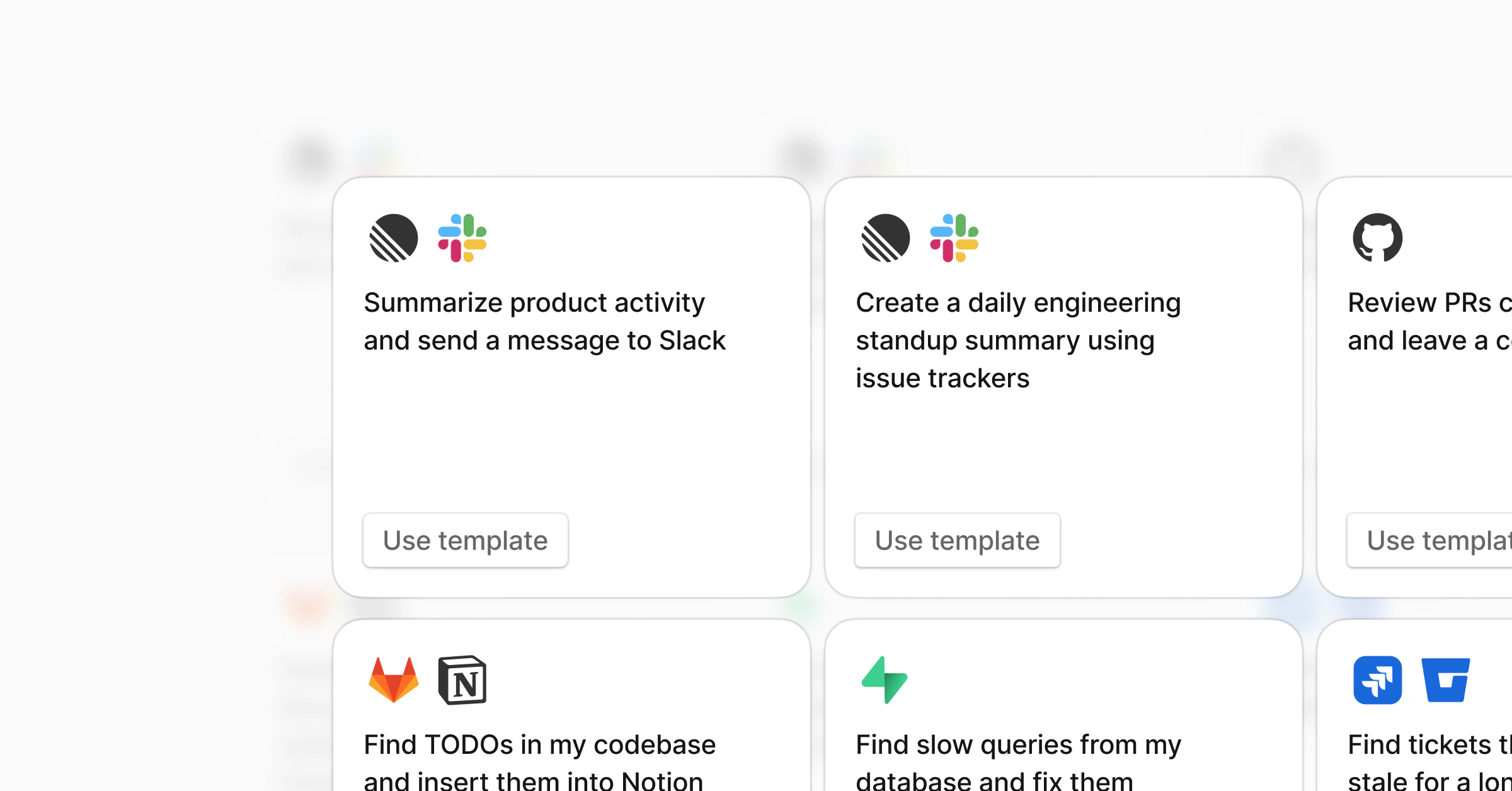
  <img src="https://mintcdn.com/test-8862363a/_KF7n4fDwDrxMgZe/images/integrations-light.png?fit=max&auto=format&n=_KF7n4fDwDrxMgZe&q=85&s=cf308a551e35d085a49c48289c6f003e" alt="Agent templates" className="block dark:hidden" width="2400" height="1256" data-path="images/integrations-light.png" />

  <img src="https://mintcdn.com/test-8862363a/_KF7n4fDwDrxMgZe/images/integrations-dark.png?fit=max&auto=format&n=_KF7n4fDwDrxMgZe&q=85&s=cae0b7d67e008d06519c8cfa8ffa93a2" alt="Agent templates" className="hidden dark:block" width="2400" height="1256" data-path="images/integrations-dark.png" />
</Frame>

1. Go to **Agents** in the [dashboard](https://app.tembo.io)
2. Click **Templates**
3. Pick a template and click **Use template**
4. Customize the instructions and enable

[Browse all templates](https://tembo.io/for)

### From scratch

1. Click **New Agent**
2. Write your instructions
3. Add triggers (schedule and/or event-based)
4. Select [agent harness](#agent-harness)
5. Instruct MCP servers or integrations
6. Optionally select a [project](/features/projects) in run options so runs start from that prepared environment
7. Save and enable

### From a repository

Store an agent's instructions, runtime settings, and recurring schedules with the code it works on. Tembo syncs each JSON file directly inside `.tembo/agents/` and creates or updates the corresponding agent in your workspace.

#### Prerequisites

* Connect your GitHub, GitLab, or Bitbucket account to Tembo.
* Activate the repository under **Active Repositories** on the [Integrations](https://app.tembo.io/integrations) page.
* Make sure you can merge changes into the repository's default branch.

#### Create a scheduled agent

<Steps>
  <Step title="Create the agent directory">
    At the root of your repository, create `.tembo/agents/`.

    Agent definitions must be `.json` files directly inside this directory. Nested files and other file types are ignored.
  </Step>

  <Step title="Add an agent definition">
    Create a file such as `.tembo/agents/weekly-changelog.json`:

    ```json theme={null}
    {
      "name": "Weekly changelog",
      "prompt": "Summarize the changes merged during the last week and open a pull request that updates the changelog.",
      "schedule": "0 9 * * 1"
    }
    ```

    `name` and `prompt` are required. The schedule above runs every Monday at 09:00 UTC.
  </Step>

  <Step title="Merge the definition">
    Commit the file and merge it into the repository's default branch. Tembo creates the agent during the next repository sync. Future changes to the file update the same agent.
  </Step>

  <Step title="Verify the agent">
    Open [Agents](https://app.tembo.io/agents), select the agent, and confirm its instructions and next scheduled run.
  </Step>
</Steps>

#### Configure multiple schedules

Use `schedules` to run the same agent on more than one cron schedule. Entries can be cron strings or objects with a `cron` property.

```json theme={null}
{
  "name": "Repository maintenance",
  "prompt": "Review the repository for stale dependencies and maintenance work. Open a pull request for safe updates.",
  "schedules": [
    "0 9 * * 1",
    { "cron": "0 12 * * 5" }
  ]
}
```

This example runs at 09:00 every Monday and 12:00 every Friday. Repository-defined schedules use UTC.

<Note>
  Use either `schedule` or `schedules` in one file, not both. You can configure up to 50 schedules for an agent.
</Note>

#### Configure the runtime

You can keep the agent's execution settings in the same file:

```json theme={null}
{
  "name": "Weekly changelog",
  "prompt": "Summarize the changes merged during the last week and open a pull request that updates the changelog.",
  "model": "codex:gpt-6.1-sol",
  "agentOptions": {
    "reasoningLevel": "high"
  },
  "mcpServers": ["linear"],
  "sandboxSize": "large",
  "projectId": "tembo",
  "artifactType": "PullRequest",
  "schedules": [
    { "cron": "0 9 * * 1" }
  ]
}
```

| Field | Description |
| - | - |
| `model` | Agent harness and model key. See [Models](/features/models) for supported options. `agent` is accepted as an alias, but do not set both. |
| `agentOptions` | Harness-specific options, such as `reasoningLevel`. |
| `mcpServers` | MCP server names that the agent can use. Connect them before the agent runs. |
| `sandboxSize` | VM size: `nano`, `micro`, `small`, `medium`, `large`, `xl`, `xxl`, or `ultra`. |
| `projectId` | A project UUID, or `tembo` to use the base environment. See [Projects](/features/projects). |
| `artifactType` | Expected result: `PullRequest`, `ToolCall`, `Plan`, `Response`, `File`, `Service`, or `Source`. |
| `schedule` | One cron expression. |
| `schedules` | Up to 50 cron strings or objects containing a `cron` property. |

Omit optional runtime fields to use the existing agent settings. For a new agent, omitted fields use your workspace defaults.

#### How synchronization works

Tembo matches an agent by its `name` within the connected repository. An agent with the same name managed by another repository remains separate.

* Changing the prompt or runtime fields updates the repository's matching agent.
* Changing the configured cron expressions adds and removes schedules to match the file.
* Omitting both `schedule` and `schedules` leaves existing schedules unchanged.
* Setting `"schedules": []` removes all schedules from the agent.
* Disabling the agent in Tembo also keeps newly synced schedules disabled.
* Removing the JSON file does not delete the agent. Delete or archive the agent from Tembo if you no longer need it.
* Changing `name` creates a different agent instead of renaming the existing one.

#### Troubleshooting

<AccordionGroup>
  <Accordion title="The agent does not appear">
    Confirm that the repository is active in [Integrations](https://app.tembo.io/integrations), the file is valid JSON with a `.json` extension, and it is directly inside `.tembo/agents/` on the default branch. Repository changes are processed asynchronously, so allow time for the next sync.
  </Accordion>

  <Accordion title="The file is skipped">
    Tembo skips that file if it contains invalid JSON, unknown fields, conflicting fields such as both `schedule` and `schedules`, an unsupported model or runtime option, an inaccessible project, or an invalid or impossible cron expression. Other valid agent files in the directory continue to sync.
  </Accordion>

  <Accordion title="A schedule runs at the wrong time">
    Repository-defined cron schedules use UTC. Convert your desired local time to UTC and account for daylight saving time when you choose the expression.
  </Accordion>

  <Accordion title="A removed file still has an agent">
    Removing a file stops source-controlled updates but does not delete or archive its existing agent. Delete or archive the agent from [Agents](https://app.tembo.io/agents).
  </Accordion>
</AccordionGroup>

## Macros

You can trigger a specific agent on demand from anywhere you can mention `@tembo` by using its macro.

```txt theme={null}
@tembo !<macro-name> <prompt>
```

Tembo routes the request to the agent with that macro and passes the rest of the message as the prompt.

For example, this triggers the agent named `review`:

```txt theme={null}
@tembo !review please review this PR
```

## Beyond code

Agents aren't limited to engineering work. With [MCP servers](/integrations/mcp), agents can work across your entire stack.

| Example | Trigger | What it does |
| - | - | - |
| Daily ARR report | Daily | Pulls revenue data from [Stripe](/integrations/mcp) and posts to [Slack](/integrations/slack) |
| Feature requests from calls | Daily | Scans call transcripts for feature requests and creates [Linear](/integrations/linear) tickets |
| Customer health check | Weekly | Summarizes support tickets, usage trends, and churn signals in [Slack](/integrations/slack) |
| Enrich CRM records | New deal created | Pulls company info and adds context to [Attio](/integrations/mcp) or your CRM |
| Create CRM tickets from Slack | `@tembo` in [Slack](/integrations/slack) | Creates a ticket in your CRM enriched with context from other connected integrations |

Any tool with an [MCP server](/integrations/mcp) can be used as an agent.

You can also do this on-demand from [Slack](/integrations/slack) without setting up an agent:

```
@tembo What's our ARR right now? Check Stripe.
```

```
@tembo Summarize the feature requests from this week's sales calls and create Linear tickets for the top 5.
```


This documentation is built and hosted on [Mintlify](https://mintlify.com), a developer documentation platform.