

BYOK (Bring Your Own Key)
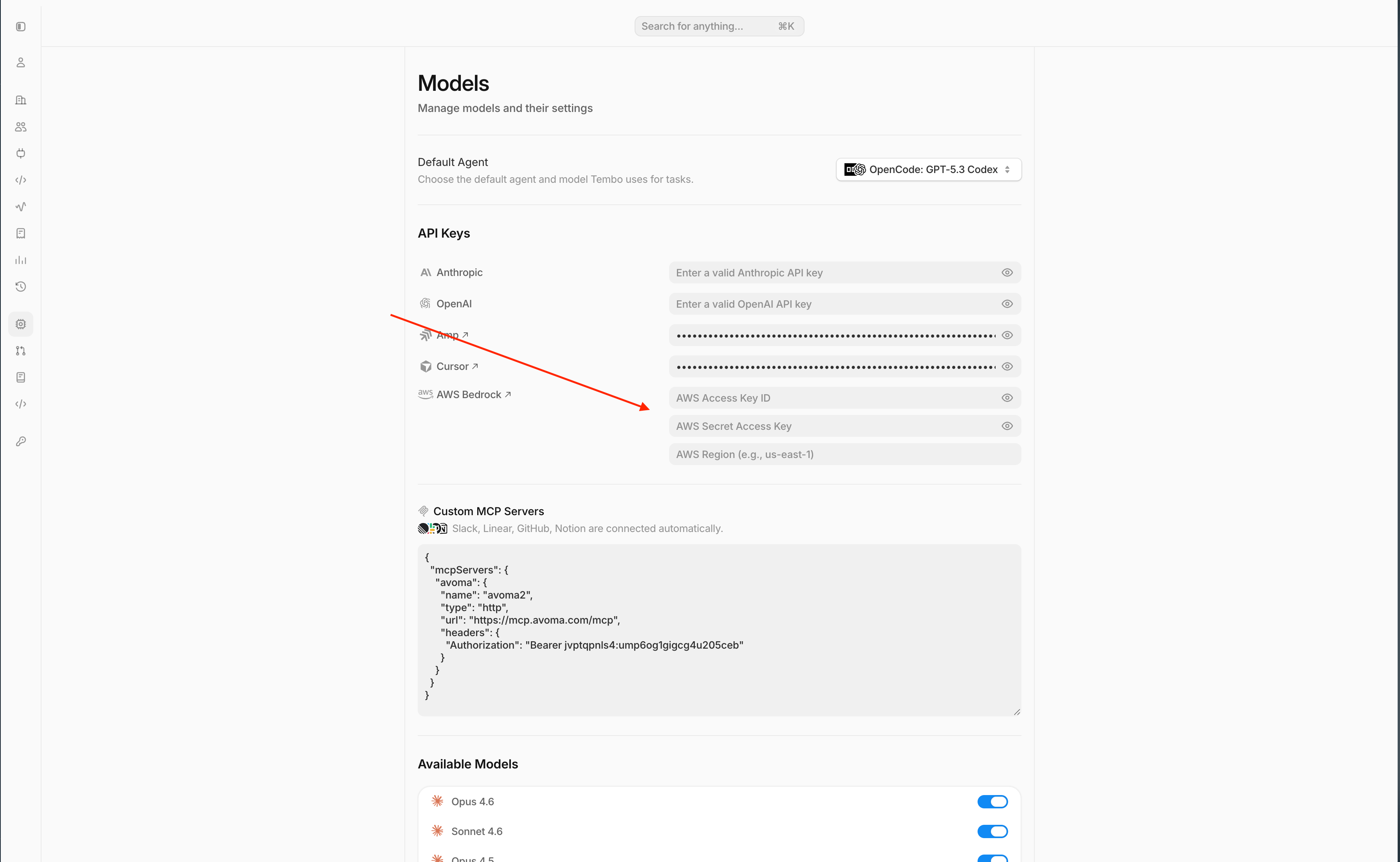
BYOK lets your workspace call models with your own provider credentials instead of Tembo-managed credentials.- Add keys in Settings -> Models -> API Keys.
- You can connect OpenAI, Anthropic, Cursor, Amp, and OpenRouter credentials on every Tembo plan, including Free.
- AWS Bedrock and GCP Vertex AI credentials require a paid Tembo plan.
- Tembo still handles orchestration, session context, sandbox execution, and PR automation.
Switch a model between BYOK and Tembo Managed Inference
Workspace admins can change the inference provider for individual models from Settings -> Models. In Available Models, use the model’s Inference dropdown to choose BYOK or Tembo Managed Inference, when those options are available for that model and workspace.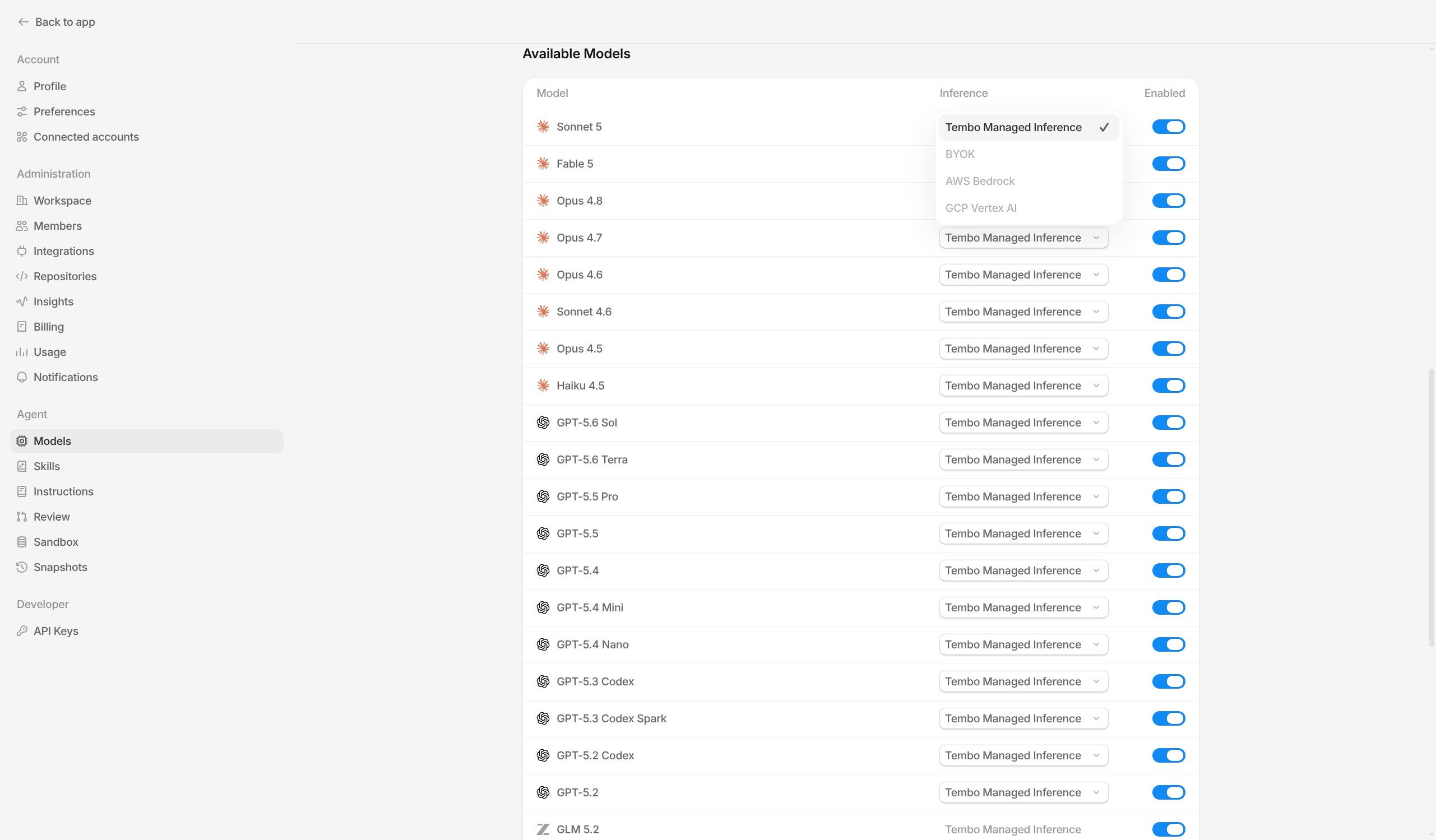
Bedrock BYOK support
Tembo supports BYOK with Amazon Bedrock. To enable it, add:- AWS Access Key ID
- AWS Secret Access Key
- AWS Region
GCP Vertex AI BYOK support
Tembo supports BYOK with GCP Vertex AI. To enable it, add:- Service account JSON
- Project ID
- Location
Connect a ChatGPT subscription
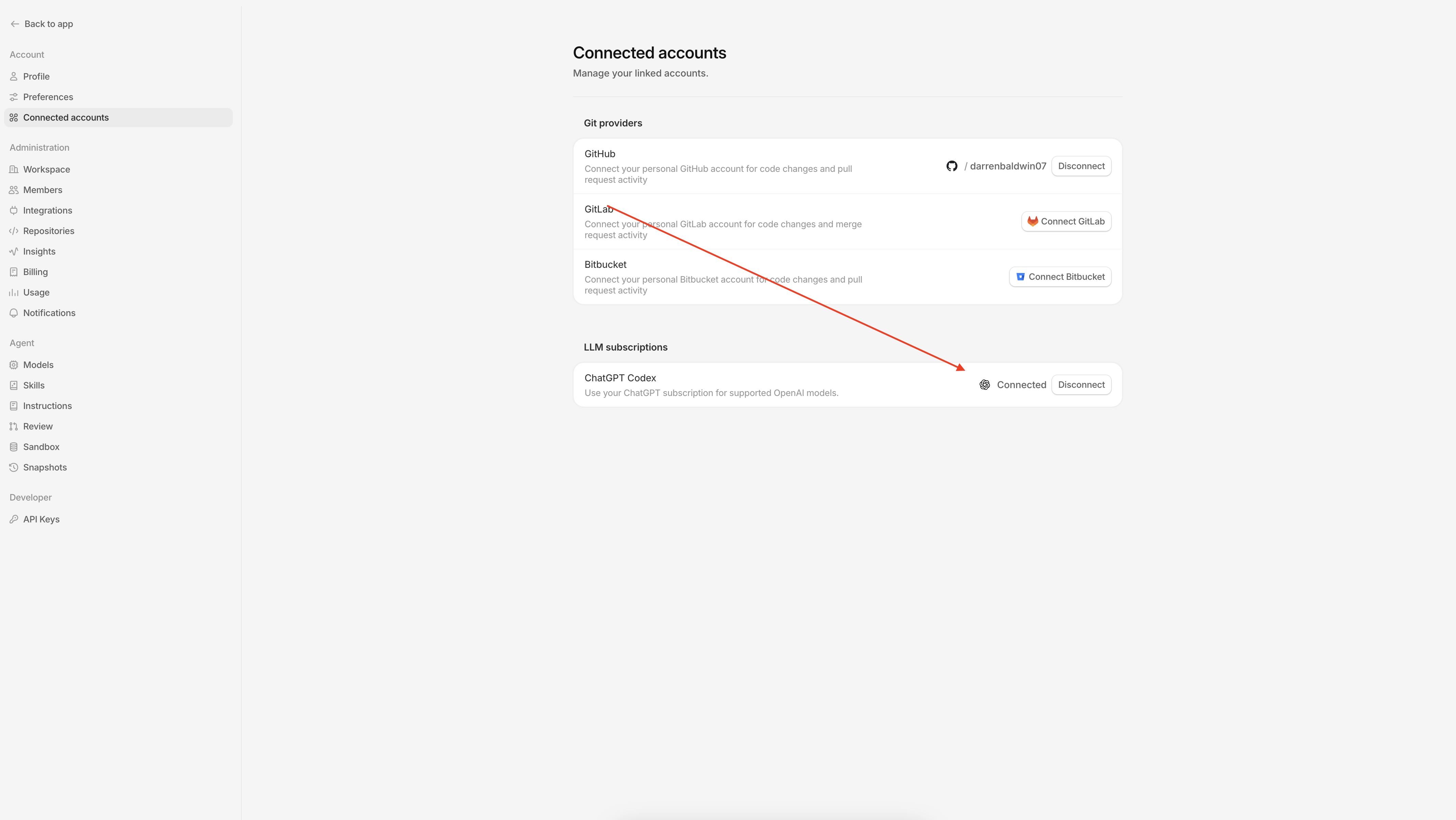
You can connect a ChatGPT subscription on every Tembo plan, including Free, to use supported OpenAI models with Codex, OpenCode, or Pi. You need a ChatGPT Plus, Pro, Business, Edu, or Enterprise plan.- Open Settings > Connected accounts.
- Under LLM subscriptions, click Connect Codex.
- Copy the authorization code, then click Open authorization page.
- Enter the code in ChatGPT and approve the connection. Keep the Tembo dialog open while authorization completes.
- Return to Tembo and confirm that ChatGPT Codex shows Connected.
If prompted, enable device code authorization in ChatGPT Settings > Security, then try connecting again.
Connect a workspace ChatGPT subscription
Org admins can connect a single ChatGPT Codex subscription for the whole workspace, instead of (or in addition to) each member connecting their own.- Open Settings > Models.
- Under Subscriptions, click Connect Codex.
- Copy the authorization code, then click Open authorization page.
- Enter the code in ChatGPT and approve the connection. Keep the Tembo dialog open while authorization completes.
Connect a Claude subscription
You can connect a Claude subscription on every Tembo plan, including Free, to use supported Anthropic models with Claude Code. You need a Claude subscription that includes Claude Code access. This connection is personal: it applies to your sessions, not other workspace members’ sessions.- Open Settings > Connected accounts.
- Under LLM subscriptions, click Connect Claude.
- Click Open Anthropic, sign in to your Claude account, and approve access. Keep the Tembo dialog open.
- On Anthropic’s confirmation page, click Copy code.
- Return to Tembo, paste the authentication code, and click Connect.
- Confirm that Claude subscription shows Connected, then start a session with Claude Code and a supported Anthropic model.
Check usage or disconnect
Once connected, the usage panel shows your remaining subscription limits and reset times when Anthropic reports them. Use the refresh button to update the panel. Usage includes activity across your Claude account, not just Tembo sessions. To disconnect, open the Connected menu and select Disconnect. If Tembo shows Reconnect Claude, repeat the connection steps above. Subscription-backed inference costs $0 through Tembo. Your sessions still use billable cloud VM compute, which draws from your workspace’s usage allowance.Connect a SuperGrok subscription
You can connect a SuperGrok subscription on every Tembo plan, including Free, to use Grok models with OpenCode or Pi.- Open Settings > Connected accounts.
- Under LLM subscriptions, click Connect SuperGrok.
- Open the xAI authorization page and enter the code shown in the dialog.
- Approve the connection in the xAI authorization page. Keep the Tembo dialog open while authorization completes.
- Return to Tembo and confirm that SuperGrok shows Connected.
Supported models
The table below reflects the models currently supported by Tembo.Model availability can vary by agent and workspace configuration. If a model is disabled in your workspace, it will not appear in agent pickers until re-enabled.